Filing crypto taxes doesn’t have to be overwhelming. With the right software and process, you can file correctly in under an hour.
Here’s the step-by-step process for US, UK, and Canada.
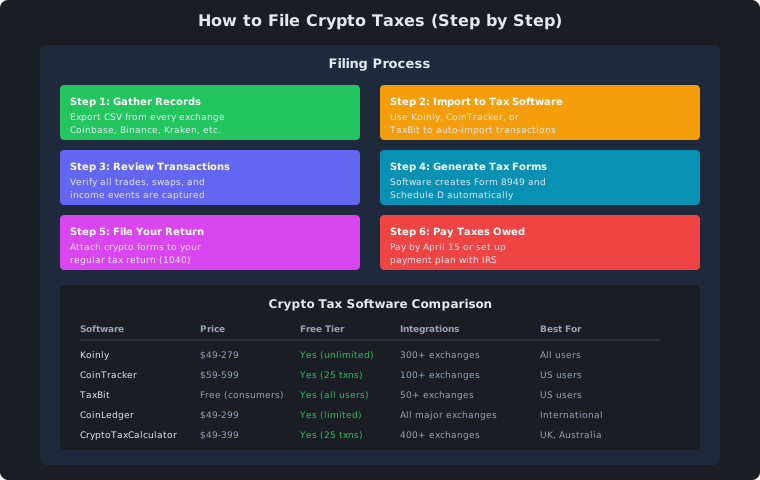
The Filing Process
Step 1: Gather All Exchange Records
Export CSV files from every exchange and wallet:
| Source | How to Export |
|---|
| Coinbase | Reports → Tax → Download |
| Binance | Orders → Trade History → Export |
| Kraken | Settings → API → Download |
| Crypto.com | Accounts → Statement |
| MetaMask | Use tax software import |
Don’t forget:
- All exchanges (even closed ones)
- DeFi wallets (MetaMask, Trust Wallet)
- Hardware wallets (Ledger, Trezor)
- Staking platforms
Step 2: Import to Tax Software
Use crypto tax software to auto-import transactions:
| Software | Import Method | Time |
|---|
| Koinly | CSV, API, wallet address | 5 min |
| CoinTracker | CSV, API | 5 min |
| TaxBit | CSV, API | 5 min |
| CoinLedger | CSV, API | 5 min |
Step 3: Review and Categorize
Check that all transactions are correctly categorized:
| Transaction Type | What to Check |
|---|
| Trades | Cost basis correct |
| Swaps | Both sides recorded |
| Income | Staking, farming, airdrops |
| Losses | Tax-loss harvesting opportunities |
Your software generates the forms you need:
| Form (US) | Purpose |
|---|
| Form 8949 | Individual crypto transactions |
| Schedule D | Capital gains summary |
| Schedule 1 | Other income (staking, etc.) |
| Form 1040 | Total tax return |
Step 5: File Your Return
| Method | Best For |
|---|
| Tax software | Most people |
| Tax professional | Complex DeFi |
| IRS Free File | Simple returns |
US Filing Details
Deadlines
| Deadline | What |
|---|
| April 15 | Tax return due |
| April 15 | Tax payment due |
| October 15 | Extension deadline |
| January 31 | Exchange sends 1099s |
| Form | When Needed |
|---|
| Form 1040 | Always |
| Schedule 1 | If you have staking income |
| Form 8949 | If you sold crypto |
| Schedule D | Capital gains summary |
Tax Rates (2026)
| Rate | Income Range |
|---|
| 0% | $0 - $47,025 |
| 15% | $47,026 - $518,900 |
| 20% | $518,901+ |
| 28% | Collectibles (NFTs) |
UK Filing Details
Deadlines
| Deadline | What |
|---|
| January 31 | Self Assessment online |
| October 31 | Paper return |
| July 31 | Second payment on account |
| Form | Purpose |
|---|
| SA100 | Main tax return |
| SA108 | Capital gains supplement |
| SA106 | Foreign income |
Canada Filing Details
Deadlines
| Deadline | What |
|---|
| April 30 | Tax return due |
| June 15 | Self-employed deadline |
| April 30 | Payment due |
| Form | Purpose |
|---|
| T1 General | Main tax return |
| Schedule 3 | Capital gains |
| T5008 | Securities transactions |
Common Filing Mistakes
| Mistake | Consequence |
|---|
| Not reporting all exchanges | IRS audit risk |
| Using wrong cost basis | Incorrect tax amount |
| Missing DeFi transactions | Underreporting income |
| Not reporting small amounts | All income is taxable |
| Filing late | Penalties and interest |
Software Recommendation
| Software | Best For | US | UK | Canada |
|---|
| Koinly | All users | Yes | Yes | Yes |
| CoinTracker | US users | Yes | No | No |
| TaxBit | Free option | Yes | No | No |
| CoinLedger | International | Yes | Yes | Yes |
| CryptoTaxCalculator | UK/AU | No | Yes | Yes |
Summary
| Key Point | Takeaway |
|---|
| Gather records | Export CSV from all exchanges |
| Use tax software | Koinly, CoinTracker, or TaxBit |
| Review transactions | Check categories and amounts |
| Generate forms | Software creates them automatically |
| File by deadline | April 15 (US), Jan 31 (UK), Apr 30 (CA) |
| Report everything | IRS/HMRC/CRA have your data |
This content is for educational purposes only. Not financial advice. Do your own research before investing.